Production Case StudyLead Generation Automation & CRM Sync

AI Real Estate Lead Generation & QualificationLead Generation Automation & CRM Workflow Engine

An AI-powered lead generation automation system built with n8n and LLMs that captures inbound inquiries, scores lead intent, updates the CRM, and sends automated personalized follow-ups in under 30 seconds.

The Problem & Bottleneck

Real estate agencies waste dozens of hours every week manually calling unvetted inquiries, resulting in slow response times (often 6+ hours) and lost high-value buyers to faster competitors.

The Architectural Solution

Built an automated end-to-end lead generation and WhatsApp/email automation pipeline in n8n paired with Gemini LLM and Supabase CRM. Inbound form leads instantly trigger automated welcome messages, AI intent scoring (budget, location, timeline), CRM profile synchronization, and automatic 48-hour follow-up loops for cold leads.

Measurable Business Results & Impact

Reduced initial lead response time from 6 hours to under 30 seconds
Eliminated 15+ hours per week of manual CRM data entry for sales agents
Achieved 100% CRM lead capture with zero duplicate entries

Detailed Case Breakdown

This project automates the complete lead management and lead generation process for real estate businesses using n8n, Gemini AI, Google Workspace, and CRM integrations. When a prospect submits an inquiry form, the workflow is automatically triggered, sends an instant personalized email/message, and creates a CRM record. If the customer replies, an AI conversational agent reads the response, understands the intent, maintains chat memory, and generates a personalized response. The AI also extracts structured information such as budget, location, property type, and buying intent, then updates the existing CRM record instead of creating duplicates. Additionally, the system monitors inactive leads and automatically sends nurture follow-up messages after 48 hours, ensuring every lead is qualified without manual intervention while keeping the CRM accurate and up to date.
Key Features & System Capabilities

Automated lead capture from Google Forms, Ads & Webhooks via n8n
Instant personalized welcome email and WhatsApp notification dispatch in < 30s
AI-powered lead qualification & intent scoring
Automated extraction of budget, property type, location, and buying timeline
Smart CRM synchronization with automatic duplicate record matching
Context-aware AI conversation agent with chat memory for email replies
Automated 48-hour follow-up loops for inactive or cold leads
Missing information request automation for 100% complete CRM profiles
Real-time intent classification (sales inquiry vs. general email)
Zero manual data entry required for sales teams and business brokers
Technologies & Integrations:AI AutomationLead Generation Automationn8n AutomationWhatsApp AutomationCRM SyncNode.jsOpenAISupabase
Swipe ?1 of 4
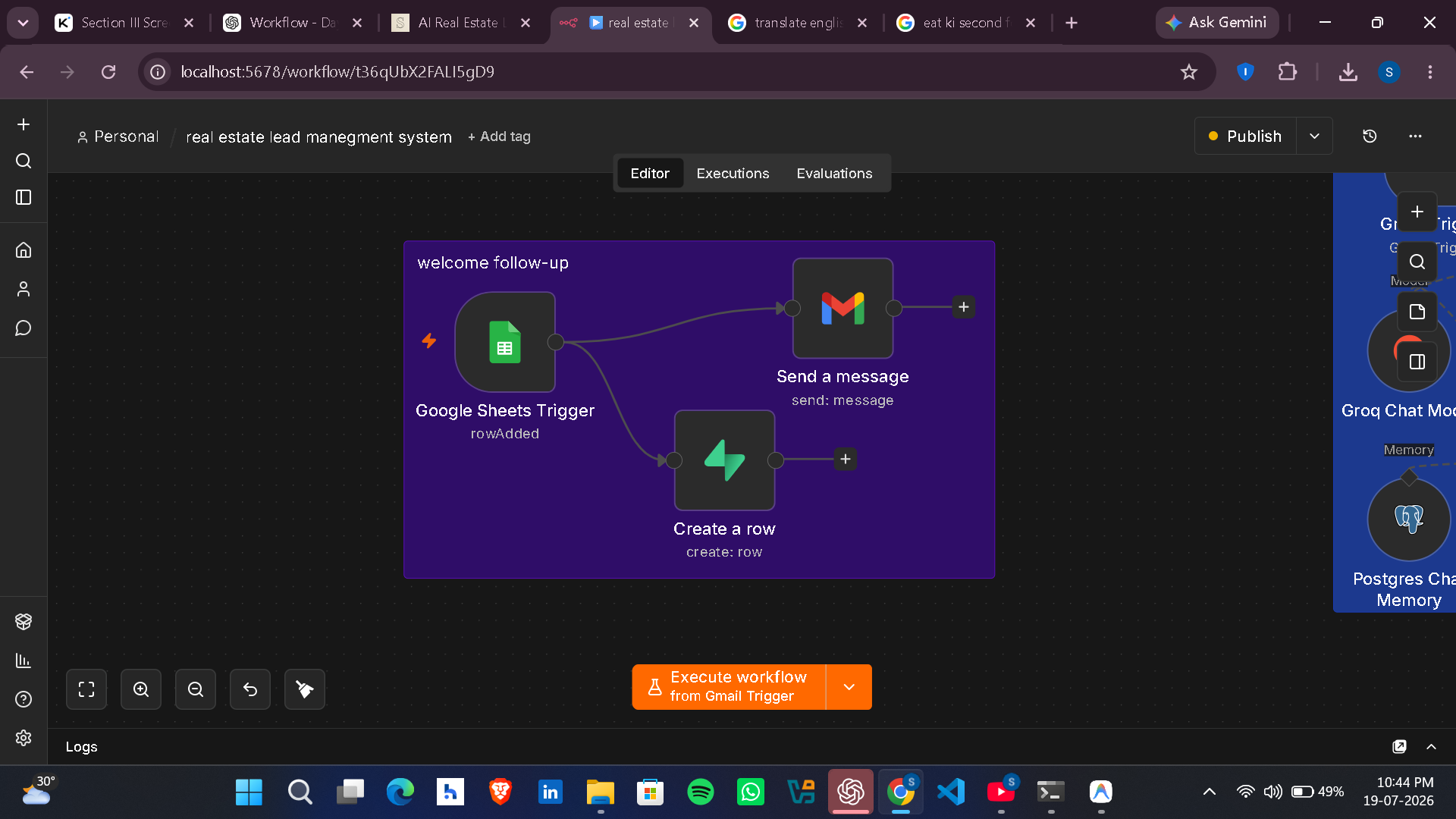
Step 1: Whenever a new lead submits the Google Form, the workflow is triggered automatically through Google Sheets. It instantly sends a personalized follow-up email

Step 1: Whenever a new lead submits the Google Form, the workflow is triggered automatically through Google Sheets. It instantly sends a personalized follow-up email

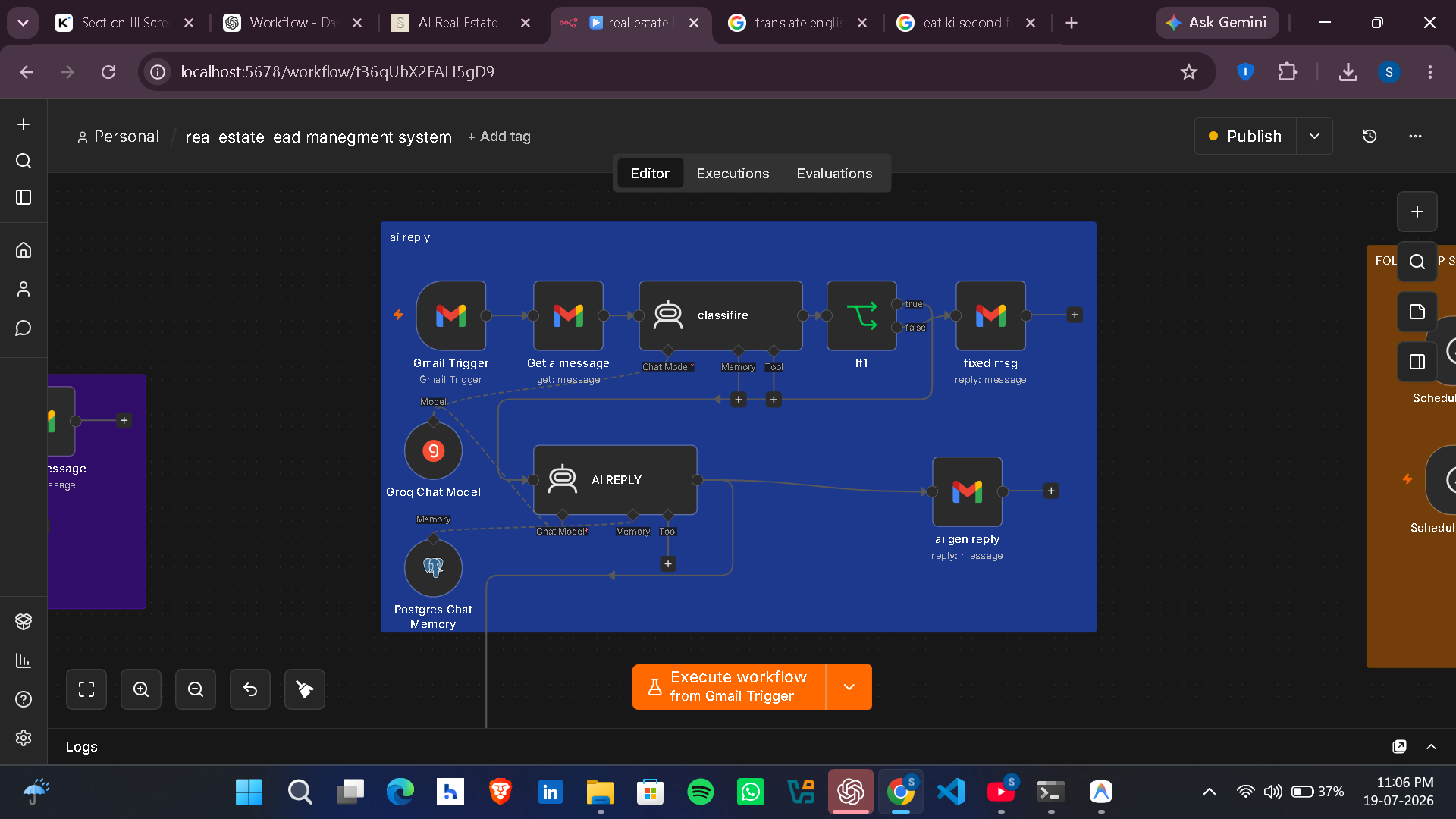
Step 2: This workflow is triggered whenever a lead replies to the follow-up email or sends a new email. The Gmail Trigger captures the incoming message, retrieves its content, and passes it to an AI agent powered by Gemini. The AI first classifies whether the email is related to real estate. If it is, the AI generates a personalized reply based on the lead's questions, previous conversation, and stored chat memory, then automatically sends the response through Gmail. If the email is not related to real estate, the workflow sends a predefined message instead. This enables natural, context-aware conversations with leads without any manual intervention.

Step 2: This workflow is triggered whenever a lead replies to the follow-up email or sends a new email. The Gmail Trigger captures the incoming message, retrieves its content, and passes it to an AI agent powered by Gemini. The AI first classifies whether the email is related to real estate. If it is, the AI generates a personalized reply based on the lead's questions, previous conversation, and stored chat memory, then automatically sends the response through Gmail. If the email is not related to real estate, the workflow sends a predefined message instead. This enables natural, context-aware conversations with leads without any manual intervention.

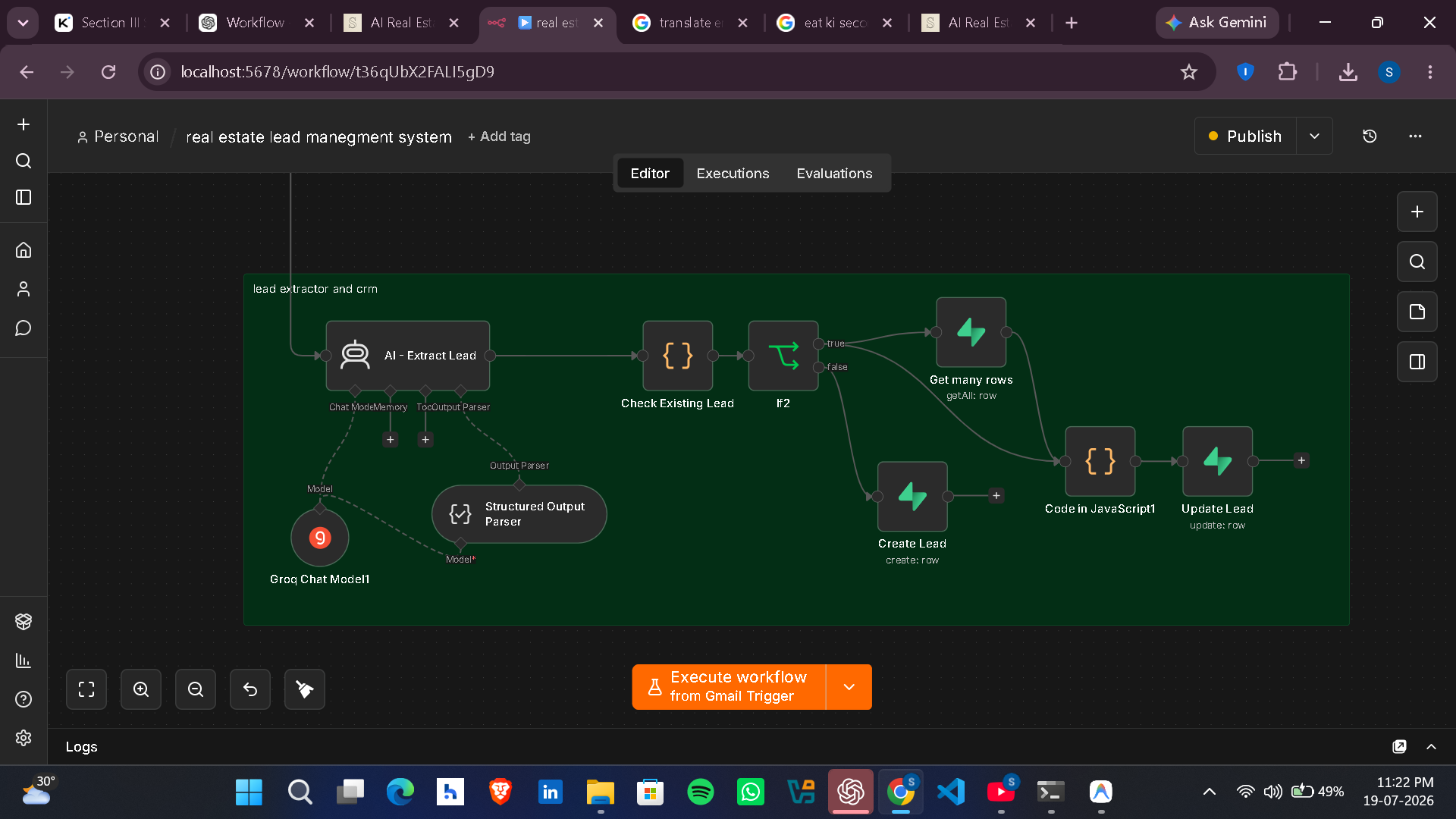
Step 3: This workflow automatically extracts important information from the customer's email using AI, such as their name, contact details, property preferences, budget, location, property type, buying intent, and other relevant requirements. The extracted data is then mapped and synchronized with the CRM. If the customer already exists in the CRM, the workflow updates the existing record with the latest information instead of creating a duplicate entry. If it's a new customer, it creates a new CRM record. This ensures the CRM always contains accurate, up-to-date information while preventing duplicate records and reducing manual data entry.

Step 3: This workflow automatically extracts important information from the customer's email using AI, such as their name, contact details, property preferences, budget, location, property type, buying intent, and other relevant requirements. The extracted data is then mapped and synchronized with the CRM. If the customer already exists in the CRM, the workflow updates the existing record with the latest information instead of creating a duplicate entry. If it's a new customer, it creates a new CRM record. This ensures the CRM always contains accurate, up-to-date information while preventing duplicate records and reducing manual data entry.

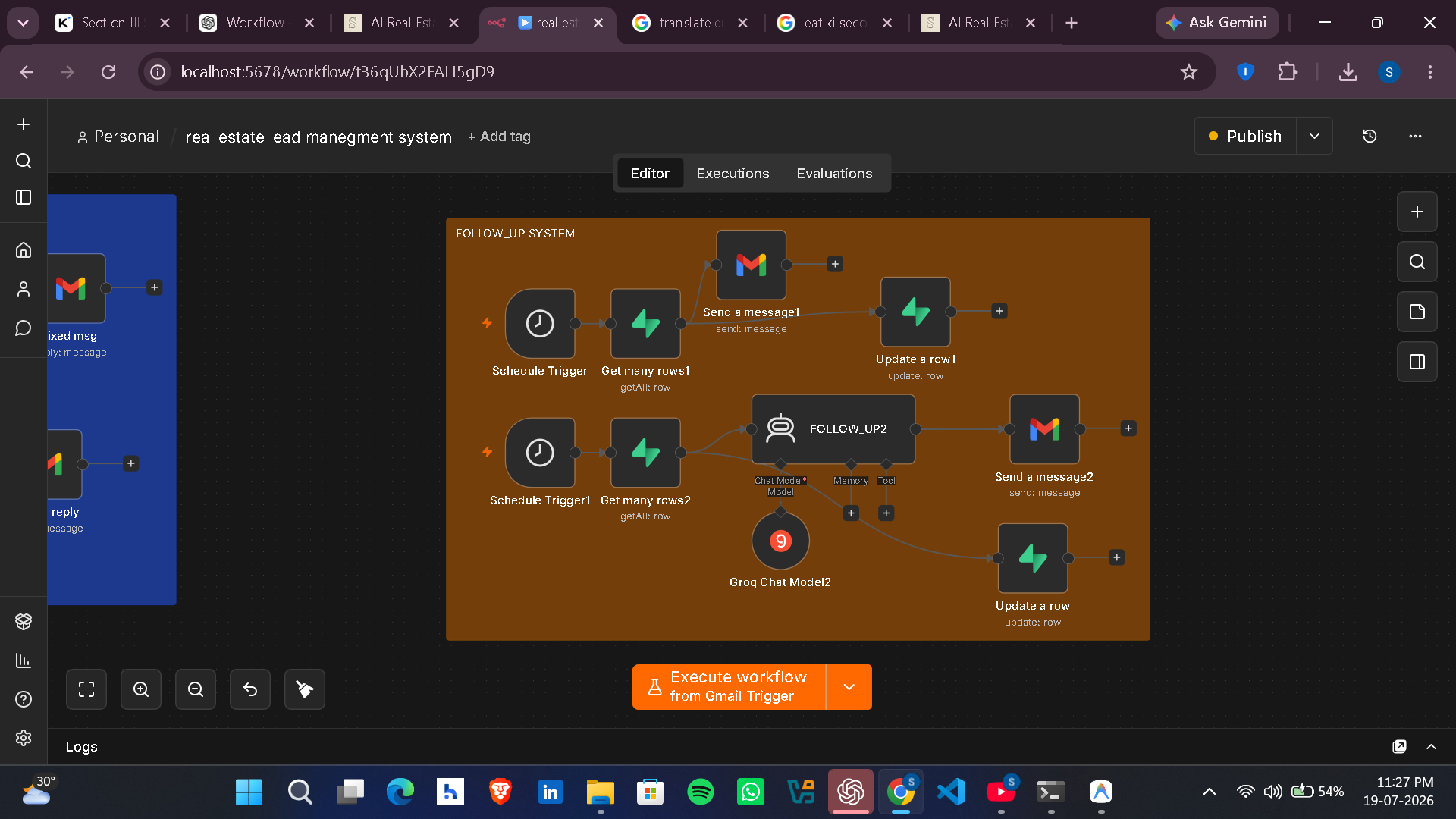
Step 4: This workflow automates the follow-up process for leads who haven't responded. If a customer does not reply within 48 hours, a scheduled workflow automatically checks the CRM and sends a personalized follow-up email. It supports two follow-up scenarios: first, reminding inactive leads to re-engage with the conversation, and second, requesting any missing information if the customer's details are incomplete. After sending the follow-up, the workflow updates the CRM to record the follow-up status and prevent duplicate reminders. This ensures every lead is nurtured consistently without requiring manual intervention.

Step 4: This workflow automates the follow-up process for leads who haven't responded. If a customer does not reply within 48 hours, a scheduled workflow automatically checks the CRM and sends a personalized follow-up email. It supports two follow-up scenarios: first, reminding inactive leads to re-engage with the conversation, and second, requesting any missing information if the customer's details are incomplete. After sending the follow-up, the workflow updates the CRM to record the follow-up status and prevent duplicate reminders. This ensures every lead is nurtured consistently without requiring manual intervention.

Tailored Automation Solution

Want a Similar System for Your Business?

Book a call to discuss building a custom AI & n8n workflow system designed specifically for your operational goals.

Book a Call for this Project